Research Synthesis · Complex Workflows · Explainable AI · Governance · Accessibility
Team:
Solo Designer
Responsibilities:
Research Synthesis · UX Flows · Interaction Design · UI Design · Prototyping · Design System
Project Overview
BACKGROUND
Banking, healthcare and commerce applications process sensitive information on mobile devices that organisations do not fully control. Security teams must protect these applications from tampering, reverse engineering, hooking, rooted devices, network interception and data exposure.
UX PROBLEM
Existing tools surface large volumes of isolated technical alerts. Analysts must manually determine what matters, connect supporting evidence and choose an appropriate response. This increases cognitive load and can lead to delayed decisions or unnecessary disruption to legitimate users.
DESIGN GOAL
Design a governed enterprise workflow that helps security teams prioritise incidents, understand AI-assisted evidence and apply proportional protection with confidence.
Problem & Design Challenge
KEY UX CHALLENGES
Alert overload makes urgent threats difficult to identify.
Analysts must connect fragmented device, application and attack evidence.
Unclear AI reasoning can create automation bias.
Aggressive responses may block legitimate customers.
High-impact decisions require approval and auditability
UX Discovery
PRIMARY USERS
Security Analyst
Prioritises incidents, reviews evidence and selects an appropriate response.
Security Administrator
Configures protection policies, simulates impact and submits changes for approval.
SUPPORTING STAKEHOLDERS
Security Lead
Reviews high-impact actions and approves consequential policy changes.
Mobile Engineer
Assesses application impact and supports technical remediation.
The Solution
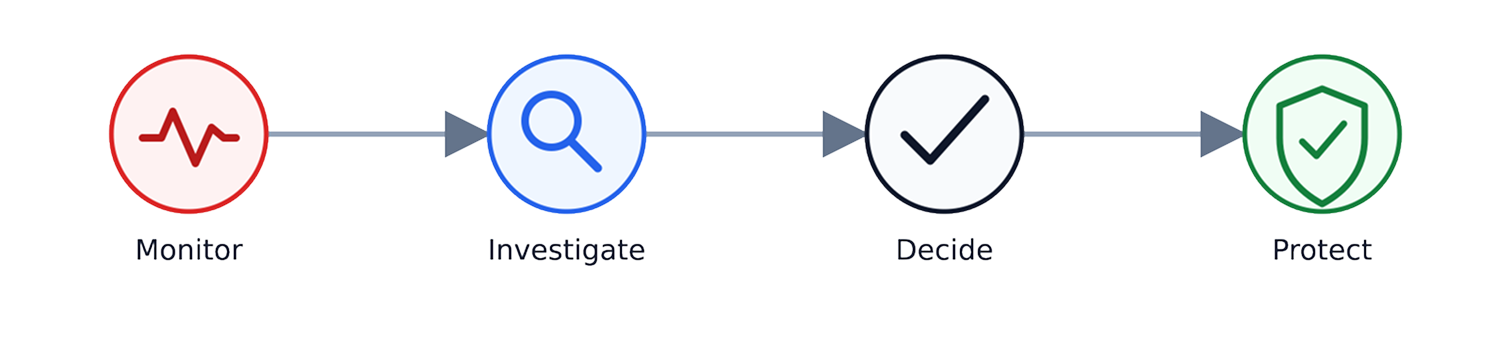
The solution transforms fragmented security alerts into one governed decision journey:
Three connected experiences support this journey:
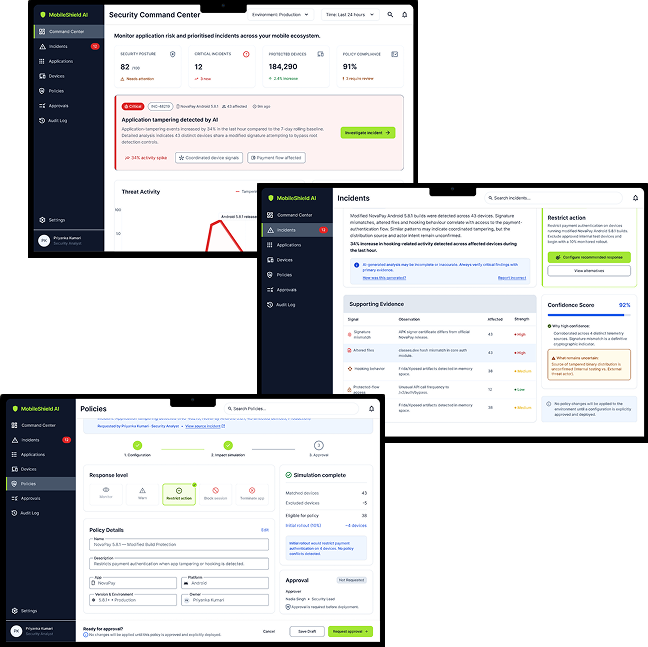
Security Command Center — Groups related signals into prioritised incidents, reducing alert overload.AI-Assisted Investigation — Presents evidence, confidence and uncertainty so analysts can verify findings and choose a proportional response.Security Policy Builder — Enables administrators to preview impact and route high-risk policy changes for approval before deployment.
AI Role & Human Control
Detection AI
Analyses structured security telemetry to identify unusual behaviour, connect related signals and prioritise incidents requiring attention.
Generative AI
Translates technical evidence into plain-language summaries, communicates uncertainty and suggests proportional next steps.
DESIGN PRINCIPLE
AI assists with prioritisation and investigation. Analysts verify the evidence and recommendations, while authorised security leads approve consequential policy changes.
Screen 1 — Security Command Center
USER GOAL
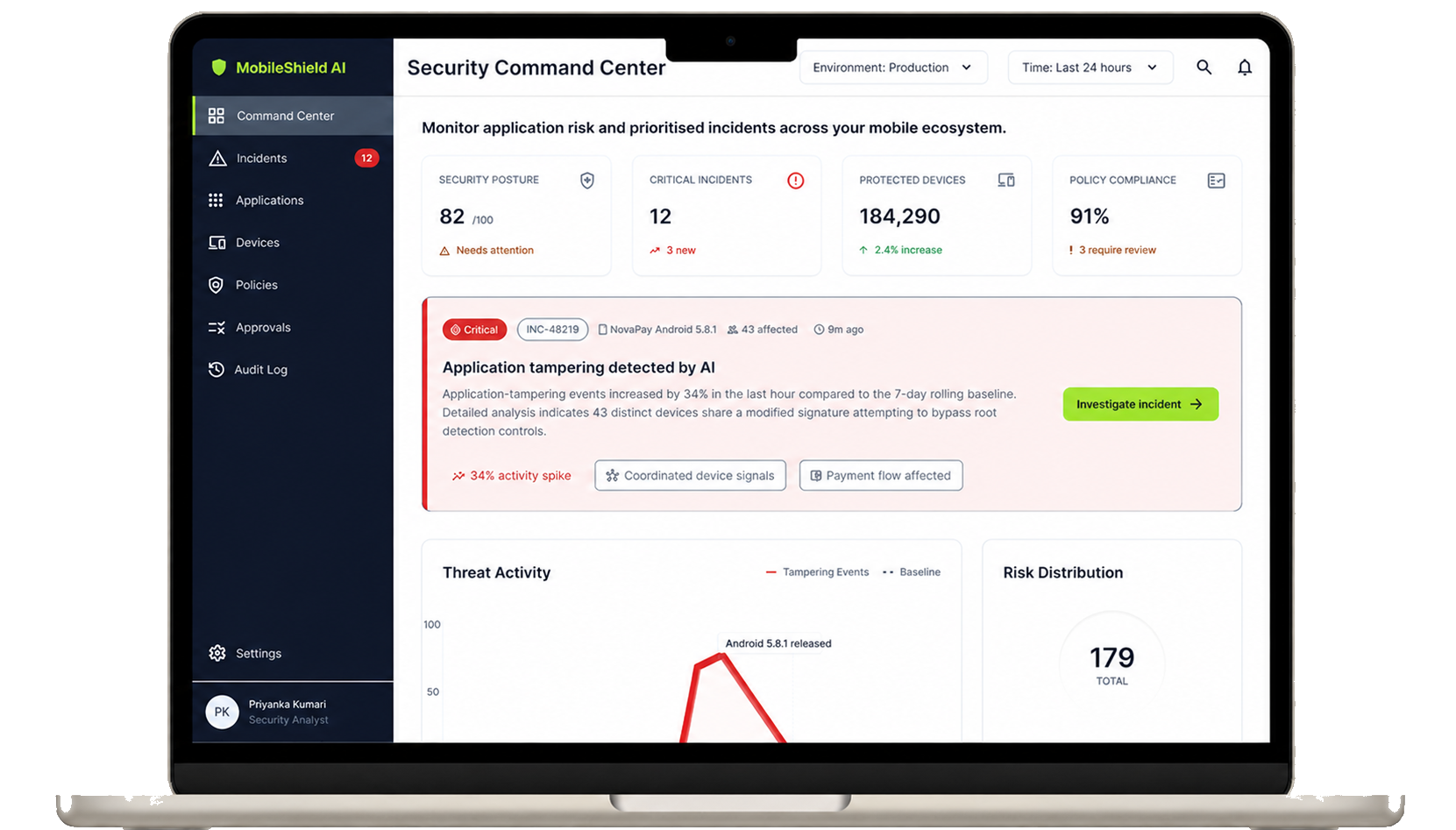
Quickly understand the overall security posture and identify which incidents require immediate attention.
KEY INTERACTION
Selecting a prioritised incident opens the investigation workspace with its context and supporting evidence.
DESIGN DECISIONS
Related alerts are grouped into prioritised incidents to reduce noise.
Security posture, critical incidents and threat trends create an at-a-glance risk summary.
Incidents connect the affected application, version and device group for faster triage.
Severity is communicated through labels and icons—not colour alone.
KEY DESIGN DECISION
To reduce alert overload, unusual changes and critical incidents are prioritised over general dashboard metrics.
Screen 2 — AI-Assisted Incident Investigation
USER GOAL
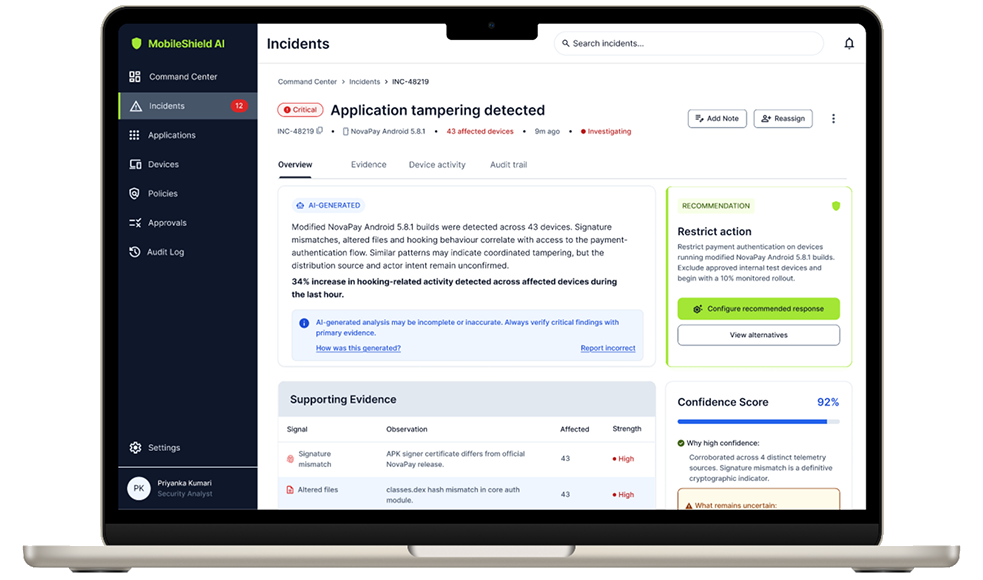
Understand why an incident is critical, verify the supporting evidence and choose an appropriate response.
The investigation workspace combines the AI summary, supporting evidence and uncertainty in one review path.
KEY INTERACTION
The analyst reviews the evidence, then accepts, modifies or dismisses the recommended response before continuing.
DESIGN DECISIONS
The AI summary translates technical signals into clear language and is explicitly labelled as AI-generated.
Evidence, confidence and uncertainty remain visible so analysts can verify the conclusion.
Recommended responses are proportional to the threat and remain under analyst control.
KEY DESIGN DECISION
AI-generated conclusions are never presented alone. Analysts can inspect the evidence, understand uncertainty and challenge the recommendation before taking action.
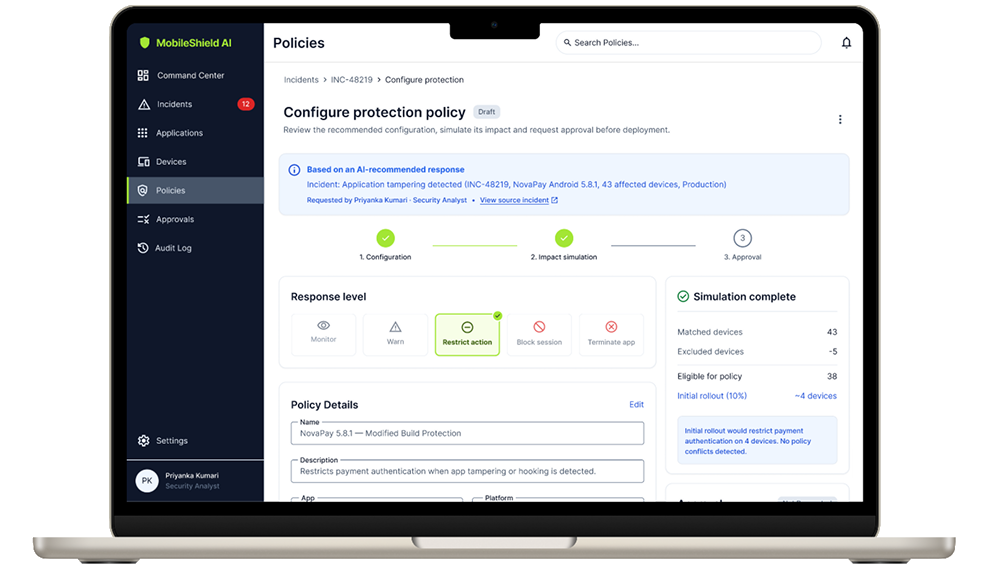
Screen 3 — Security Policy Builder
USER GOAL
Configure protection that matches the severity of a threat while minimising disruption to legitimate users.
Before requesting approval, the administrator reviews the estimated impact, affected devices and rollout scope.
PROPORTIONAL RESPONSE MODEL
KEY DESIGN DECISION
Impact simulation and staged rollout expose potential consequences before deployment, reducing disruption while keeping high-risk changes governed and auditable.
Typography & Colour System
A token-based visual foundation created for clarity, accessibility and rapid decision-making across complex enterprise security workflows.
Typography
Aa
Font family
Inter
Inter is used throughout the MobileShield AI interface to maintain clarity, consistency and readability across dense enterprise security workflows.
MobileShield AI connects monitoring, investigation, decision-making and protection within one governed security workflow.
This is a self-initiated concept; production validation and measurable product outcomes would be evaluated through usability testing and real-world implementation.
DESIGN OUTCOMES
Groups related alerts into prioritized incidents for faster triage.
Makes AI assistance explainable through evidence and uncertainty.
Supports proportional responses through impact preview and staged rollout.
Clarifies decision authority across analysts, administrators and security leads.
Cybersecurity UX is not about displaying more threat data. It is about helping people understand risk, verify evidence and take accountable action under uncertainty.
This concept reinforced that AI in high-stakes products should explain and support decisions—not make consequential choices on behalf of people.